| Motherboard Categories |
|
|
| Sponsor |
|
|
| Links |
|
|
|
| August 3, 2007 |
| Serial ATA (SATA) |
|
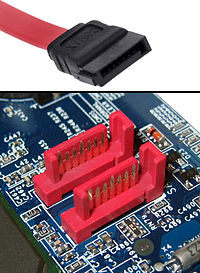
Serial ATA (SATA) is a computer bus primarily designed for transfer of data between a computer and storage devices (like hard disks or optical drives). The main benefits are thinner cable that let air cooling work more efficiently, faster transfers, ability to remove devices while operating (Hot swapping), and more reliable operation with tighter data integrity checks. It was designed as a successor to the legacy Advanced Technology Attachment (ATA) standard, and is expected to eventually replace the older technology (retroactively renamed Parallel ATA or PATA). Serial ATA adapters and devices communicate over a high-speed serial link.
Here is the variants of SATA:
- SATA 1.5 Gbit/s
First-generation SATA interfaces (also known as SATA/150 or (unofficially) as SATA 1) has actual uncoded transfer-rate at 1.2 Gbit/s or 150 MB/s. In actual operation, SATA/150 and PATA/133 are comparable in terms of their theoretical burst-throughput. However, newer SATA devices offer enhancements (such as native command queuing) to SATA's performance in a multitask environment. For comparison, modern desktop hard drives transfer data at a maximum of ~90 MB/s, which is well within the performance capabilities of even the older PATA/133 specification.
- SATA 3.0 Gbit/s
On this version, a 3 Gbit/s signaling rate was added to the Physical layer (PHY layer), effectively doubling data throughput from 150 MB/s to 300 MB/s. SATA/300's transfer rate is expected to satisfy drive throughput requirements for some time, as the fastest desktop hard disks barely saturate a SATA/150 link. This is why a SATA data cable rated for 1.5 Gbit/s will currently handle second generation, SATA 3.0 Gbit/s sustained and burst data transfers without any loss of performance.
About compatibility issue, SATA/300's autonegotiation sequence is designed to fallback to SATA/150 speed (1.5 Gbit/s rate) when in communication with such devices. In practice, some older SATA controllers do not properly implement SATA speed negotiation. Affected systems require user-intervention to manually set the SATA 3.0 Gbit/s peripherals to 1.5 Gbit/s mode, generally through the use of a jumper.
The 3.0 Gbit/s specification has been very widely referred to as “Serial ATA II” (“SATA II”), contrary to the wishes of the Serial ATA standards organization that authored it. The official website notes that SATA II was in fact that organization's name at the time, the SATA 3.0 Gbit/s specification being only one of many that the former SATA II defined, and suggests that “SATA 3.0 Gbit/s” be used instead.
- SATA 6.0 Gbit/s
SATA's roadmap includes plans for a 6.0 Gbit/s standard. In current PCs, SATA 3.0 Gbit/s already greatly exceeds the sustainable (non-burst) transfer rate of even the best hard disks. The 6.0 Gbit/s standard is right now useful in combination with port multipliers, which allow multiple drives to be connected to a single Serial ATA port, thus sharing the port's bandwidth with multiple drives. Solid-state drives such as RAM disks may also one day exploit the faster transfer rate.
- External SATA
Standardized in mid-2004, eSATA defined separate cables, connectors, and revised electrical requirements for external applications :
- Minimum transmit potential increased: Range is 500–600 mV instead of 400–600 mV.
- Minimum receive potential decreased: Range is 240–600 mV instead of 325–600 mV.
- Identical protocol and logical signaling (link/transport-layer and above), allowing native SATA devices to be deployed in external enclosures with minimal modification.
- Maximum cable length of 2 m (USB and FireWire allow longer distances)
Aimed at the consumer market, eSATA enters an external storage market already served by the USB and FireWire interfaces.
Read More...Labels: Knowledge
|
|
|
| posted by admin |
|
|
|
| July 27, 2007 |
| The AGP Variation |
|
A number of non-standard variations of the AGP interface have been produced by manufacturers.
- 64 bit AGP
A 64-bit channel. Used in high end professional graphic cards. It was once proposed as an optional standard for AGP 3.0 in draft documents, but was dropped in the final version of the standard.
- AGP Express
Not a true AGP interface, but rather a way to allow an AGP card to be connected over the legacy PCI bus on a PCI Express motherboard. It is a technology found on ECS motherboards, and is used as a selling point for AGP card owners who want a new motherboard but do not want to be forced to buy a PCIe graphics card as well (most new motherboards do not provide AGP slots, only PCIe slots). An "AGP Express" slot is basically a PCI slot (with the electrical power of two) in the AGP form factor. While it offers backward compatibility with AGP cards, its disadvantages include incomplete support (some AGP cards do not work with AGP Express) and reduced performance - the card is forced to use the shared PCI bus at its lower bandwidth, rather than having exclusive use of the faster AGP.
- AGI
The ASRock Graphics Interface (AGI) is a proprietary variant of the Accelerated Graphics Port (AGP) standard. Its purpose is to provide AGP-support for those of Asrock's motherboards that use chipsets lacking native AGP-support. However, it's not fully compatible and several videocard chipsets are known to not be supported. The performance and the quality of that interface is somewhat questionable.
- AGX
The EpoX Advanced Graphics eXtended (AGX) is also a proprietary variant of the Accelerated Graphics Port (AGP) standard. It shares the same problems with the AGI port explained above. User manuals even recommend not using AGP 8X ATI cards with AGX slots.
- Ultra-AGP, Ultra-AGPII
It is an internal AGP interface standard used by SiS for the north bridge controllers with integrated graphics. The original version supports same bandwidth as AGP 8x, while Ultra-AGPII has maximum 3.2GB/s bandwidth.
- XGP
The Biostar Xtreme Graphics Port is also a variant of the Accelerated Graphics Port (AGP) standard. It is similar to the two standards above, in that it supports AGP cards with chipsets that do not support AGP. Also like the above, it has support issues with many AGP cards.
- AGR
The Advanced Graphics Riser is a variation of the AGP port used in some PCIe motherboards to offer a limited backwards compatibility with AGP. It is, effectively, a modified PCI slot with no direct interconnection with the CPU or memory, and thus slower even compared to an AGP 1x slot. Its actual compatibility with AGP cards is also limited, while motherboard manufacturers usually publish a specific compatibility list.
Source : Wikipedia
Labels: Knowledge
|
|
|
| posted by admin |
|
|
|
| July 26, 2007 |
| AMD 690G Chipset |
|
This chipset is also known by its codename RS690. Two chipsets were released based on the RS690 core, AMD 690G and AMD 690V. The first is based on Radeon X1250 graphics engine supporting HDMI, while the second is based on Radeon X1200 graphics engine with no HDMI support. Even though the name of these engines are in the “1000” range, they are still Shader 2.0 engines (DirectX 9.0), not Shader 3.0 (DirectX 9.0c).
AMD 690G graphics core runs at 400 MHz and has four pixel shader processors and four vertex shader processors. Competing products from nVidia (i.e. GeForce 6100 and GeForce 7025/7050 families) have only two shader processors and two vertex shader processors, but they run at a higher clock rate (425 MHz on GeForce 6100, 7025 and 7050 and 475 MHz on GeForce 6150 – except LE and SE models) and are Shader 3.0 (DirectX 9.0c). The previous integrated graphics solution from ATI, Radeon X1100, runs at 300 MHz.
The good thing about AMD 690G chipset is that it has two independent video controllers inside, providing two video outputs on-board : one standard VGA output and one DVI output, allowing you to connect two video monitors to your computer at the same time without needing to install an add-on video card. This is simply great, especially if you think that the primary target of this motherboard is digital home PCs.
Finally, AMD 690G is the first chipset with on-board video from AMD/ATI to support Avivo, which is the name given by ATI to their set of 2D-enhancement technologies, like de-interlacing. The equivalent technology on nVidia world, PureVideo, is available on all current nVidia chipsets with integrated graphics but on GeForce 7025.
Labels: AMD, Knowledge
|
|
|
| posted by admin |
|
|
|
| July 24, 2007 |
| Sony/Philips Digital Interface Format (S/PDIF) |
|
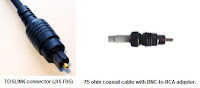
S/PDIF stands for Sony/Philips Digital Interface Format, the two companies being the primary designers of the S/PDIF format. S/PDIF is a collection of hardware and low-level protocol specifications for carrying digital audio signals between devices and stereo components. It is more recently part of a larger collection of standards IEC 60958 (often referred to as AES/EBU), where it is known as IEC 958 type II. S/PDIF is essentially a minor modification of the original AES/EBU standard for consumer use, providing small differences in the protocol and requiring less expensive hardware. A common use for the S/PDIF interface is to carry compressed digital audio as defined by the standard IEC 61937. This mode is used to connect the output of a DVD player to a home theater receiver that supports Dolby Digital or DTS surround sound.
There are no differences in the signals transmitted over optical or coaxial S/PDIF connectors—both carry exactly the same information. Selection of one over the other rests mainly on the availability of appropriate connectors on the chosen equipment and the preference and convenience of the user. Connections longer than 6 meters or so, or those requiring tight bends, should use coaxial cable, since the high light signal attenuation of TOSLINK cables limits its effective range. On the other hand, TOSLINK cables are not susceptible to ground loops and RF interference like coaxial cables. One deciding factor for many is cost—any standard 75 ohm A/V cable can be used for coaxial connectivity, while TOSLINK requires a proprietary cable which is often sold at a high mark-up.
Read more about S/PDIF here.
Labels: Knowledge
|
|
|
| posted by admin |
|
|
|
|
| FireWire (IEEE 1394) |
|

FireWire is Apple's brand name for the IEEE 1394 interface (although the 1394 standard also defines a backplane interface). It is also known as iLink (Sony’s name). FireWire system is commonly used for connection of data storage devices and DV (digital video) cameras, but is also popular in industrial systems for machine vision and professional audio systems. It is used instead of the more common USB due to its faster effective speed, higher power-distribution capabilities, and because it does not need a computer host. FireWire is also available in wireless, fibre optic and coaxial versions.
Almost all modern digital camcorders have included this connection since 1995. Many computers intended for home or professional audio/video use have built-in FireWire ports. And today, it is also widely available on retail motherboards for do-it-yourself PCs, alongside USB. FireWire was used with initial models of Apple's iPod, but later models eliminated FireWire support in favor of USB due to space constraints and for wider compatibility.

|

|
|
4-pin (left) and 6-pin (right) FireWire
|
6-pin FireWire connector
|
Labels: Knowledge
|
|
|
| posted by admin |
|
|
|
| July 16, 2007 |
| Southbridge |
|
The Southbridge, also known as the I/O Controller Hub (ICH), is a chip that implements the "slower" capabilities of the motherboard in a northbridge/southbridge chipset computer architecture. The southbridge can usually be distinguished from the northbridge by not being directly connected to the CPU. Rather, the northbridge ties the southbridge to the CPU.
Because the southbridge is further removed from the CPU, it is given responsibility for the slower devices on a typical microcomputer. A particular southbridge will usually work with several different northbridges, but these two chips must be designed to work together; there is no industry-wide standard for interoperability between different core logic chipset designs. Traditionally this interface between northbridge and southbridge was simply the PCI bus, however since this created a performance bottleneck, most current chipsets use a different (often proprietary) interface with higher performance.
Labels: Knowledge
|
|
|
| posted by admin |
|
|
|
|
| Northbridge |
|
The northbridge typically handles communications between the CPU, RAM, AGP or PCI Express, and the southbridge. Some northbridges also contain integrated video controllers, which are also known as a Graphics and Memory Controller Hub (GMCH). Because different processors and RAM require different signalling, a northbridge will typically work with only one or two classes of CPUs and generally only one type of RAM. There are a few chipsets that support two types of RAM (generally these are available when there is a shift to a new standard). For example, the northbridge from the NVIDIA nForce2 chipset will only work with Socket A processors combined with DDR SDRAM, the Intel i875 chipset will only work with systems using Pentium 4 processors or Celeron processors that have a clock speed greater than 1.3 GHz and utilize DDR SDRAM, and the Intel i915g chipset only works with the Intel Pentium 4 and the Celeron, but it can use DDR or DDR2 memory.
Labels: Knowledge
|
|
|
| posted by admin |
|
|
|
| July 11, 2007 |
| Front Side Bus (FSB) |
|
In computers, the front side bus (FSB) or system bus is the physical bi-directional data bus that carries all electronic signal information between the central processing unit (CPU) and the northbridge. Some computers also have a back side bus which connects the CPU to a memory cache. This bus and the cache memory connected to it are faster than accessing the system RAM via the front side bus.
The maximum theoretical bandwidth of the front side bus is determined by the product of its width, its clock frequency and the number of data transfers it performs per clock tick. For example, a 32-bit (4-byte) wide FSB with a frequency of 100 MHz that performs 4 transfers/tick has a maximum bandwidth of 1600 MB/second. The number of transfers per tick is dependent on the technology used, with (for example) GTL+ offering 2 transfers/tick, EV6 4 transfers/tick, and AGTL+ 8 transfers/tick.
Related Component Speeds
- CPU
The frequency at which a processor (CPU) operates is determined by applying a clock multiplier to the front side bus (FSB) speed. For example, a processor running at 550 MHz might be using a 100 MHz FSB. This means there is an internal clock multiplier setting (also called bus/core ratio) of 5.5; the CPU is set to run at 5.5 times frequency of the front side bus: 100 MHz × 5.5 = 550 MHz. By varying either the FSB or the multiplier, different CPU speeds can be achieved.
- Memory
Setting a FSB speed is related directly to the speed grade of memory that a system must use. The memory bus connects the northbridge and RAM, just as the front side bus connects the CPU and northbridge. Often, these two buses must operate at the same frequency. Increasing the front-side bus to 170 MHz means also running the memory at 170 MHz in most cases.
In newer systems, it is possible to see memory ratios of "4:5" and the like. The memory will run 5/4 times as fast as the FSB in this situation, meaning a 133 MHz bus can run with the memory at 166 MHz. This is often referred to as an 'asynchronous' system. It is important to realize that, due to differences in CPU and system architecture, overall system performance can vary in unexpected ways with different FSB-to-memory ratios.
In complex image, audio, video, gaming, and scientific applications where the data set is large, FSB speed becomes a major performance issue. A slow FSB will cause the CPU to spend significant amounts of time waiting for data to arrive from system memory.
- Peripheral Buses
Similar to the memory bus, the PCI and AGP buses can also be run asynchronously from the front side bus. In older systems, these buses operated at a set fraction of the front side bus frequency. This fraction was set by the BIOS. In newer systems the PCI, AGP, and PCI Express peripheral buses often receive their own clock signals, which eliminates their dependence on the front side bus for timing.
Labels: Knowledge
|
|
|
| posted by admin |
|
|
|
|
| BIOS |
|

BIOS, in computing, stands for Basic Input/Output System also incorrectly known as Basic Integrated Operating System and occasionally Built In Operating System. BIOS refers to the firmware code run by an IBM compatible PC when first powered on. The primary function of the BIOS is to prepare the machine so other software programs stored on various media (such as hard drives, floppies, and CDs) can load, execute, and assume control of the PC. This process is known as booting up.
BIOS can also be said to be a coded program embedded on a chip that recognizes and controls various devices that make up the PC. The term BIOS is specific to personal computer vendors. Among other classes of computers, the generic terms boot monitor, boot loader or boot ROM are commonly used. Boot is short for bootstrapping.
How the BIOS boots ?
The BIOS runs off the PROM, EPROM or, most commonly, flash memory when the computer is powered on. It initializes several motherboard components and peripherals, including:
- the clock generator,
- the processors and caches,
- the chipset (memory controller and I/O controller),
- the system memory,
- all PCI devices (by assigning bus numbers and resources),
- the primary graphics controller,
- mass storage controllers (such as SATA and IDE controllers),
- various I/O controllers (such keyboard/mouse and USB).
Finally, it loads the boot loader for the operating system, and transfers control to it. The entire process is known as Power-on self-test (POST). On the original IBM PC, the hardware only needed minimal configuration and POST was indeed used for testing; on modern systems, most of POST actually consists of hardware configuration. Once system memory is initialized, the BIOS typically copies/decompresses itself into that memory and keeps executing from it.
Nearly all BIOS implementations can optionally execute a setup program interfacing the nonvolatile BIOS memory (CMOS). This memory holds user-customizable configuration data (time, date, hard drive details, etc.) accessed by BIOS code. The 80x86 source code for early PC and AT BIOS was included with the IBM Technical Reference Manual. In most modern BIOS implementations, users select which device boots first: CD, hard disk, floppy disk, flash keydrive and the like. This is particularly useful for installing operating systems or booting to Live CDs, and for selecting the order of testing for the presence of bootable media. Some BIOS's allow the user to select the operating system to load (e.g. load another OS from the second hard disk), though this is more often handled by a second-stage boot loader.
Labels: Knowledge
|
|
|
| posted by admin |
|
|
|
|
| Search another Motherboard |
|
|
| Previous Post |
|
| Subscribe for daily update |
|
|
| Archives |
|
|
| Template by |

|
|


